
The Loop Chronicles: Summer 2026 Recap

Alvaro Saburido
@alvarosabu
Yo! Welcome back to The Loop Chronicles. We skipped the July and August editions because, honestly, we were too busy shipping. Rubber ducks 🐥, mostly... into the pool 🏊... with <RigidBody collider="ball"> on each one, because a duck that doesn't bob is a frankly a downright lie. Between cannonballs we also found time to ship some code 🚀, so this one is a double feature: everything that landed across the TresJS ecosystem between July and mid-September 2026, wrapped up in @tresjs/core@5.9.2, @tresjs/cientos@5.9.2 and @tresjs/rapier@1.1.2. Grab a coffee ☕, this is a long one.
Portals have entered the scene
The headline. TresJS can now render a scene inside another scene, through a mesh, with proper perspective. Two new pieces make it work (#1445):
<TresPortal>in@tresjs/core: reparents its declarative children into any targetObject3DorScene. It is a thin wrapper over Vue's<Teleport>, so children stay fully reactive.<MeshPortalMaterial>in@tresjs/cientos: renders its children into a private scene and projects that scene onto the host mesh as a perspective-correct, geometry-masked window. A port of the beloved drei MeshPortalMaterial.
Here is what that looks like when you push it: an RPG difficulty selector where each card is a portal into its own world, with its own lighting, fog and environment.
The API is exactly what you would hope for. Put a <MeshPortalMaterial> on a mesh and declare the portal's contents as its children:
<script setup lang="ts">
import { TresCanvas } from '@tresjs/core'
import { Environment, MeshPortalMaterial, OrbitControls } from '@tresjs/cientos'

const blend = ref(0)
</script>

<template>
  <TresCanvas>
    <TresPerspectiveCamera :position="[0, 0, 6]" />
    <OrbitControls />

    <TresMesh>
      <TresPlaneGeometry :args="[3, 4]" />
      <MeshPortalMaterial :blend="blend">
        <!-- Everything in here renders INTO the portal, not the main scene -->
        <Suspense>
          <Environment preset="dawn" :background="true" />
        </Suspense>
        <TresMesh :position="[0, 0, -1]">
          <TresTorusKnotGeometry :args="[0.6, 0.25, 128, 32]" />
          <TresMeshStandardMaterial color="#fbb03b" />
        </TresMesh>
      </MeshPortalMaterial>
    </TresMesh>
  </TresCanvas>
</template>
A few details that make it feel like Vue rather than a shader trick:
- World-space parallax. The portal scene is rendered to a frame buffer every frame with the active camera, so orbiting around the mesh shows different angles through the surface. It is a window, not a sticker.
- Per-portal environments.
<MeshPortalMaterial>overrides the injected scene context for its children, so<Environment>andattach="background"target the portal scene, not the world. Every portal gets its own sky. blendcross-fades between the world (0) and the portal (1). Animate it to1and you are inside the portal, rendered fullscreen. That is how the "enter the portal" moment in the demo works.resolution,worldUnitsandrenderPriorityare there when you need to tune it.
And if you only need the structural half, <TresPortal :to="scene"> on its own is handy for render targets, minimaps or anything that wants a mesh to live in a scene other than the one it was declared in.
blur (edge fade) and pointer events forwarded into the portal scene are not implemented yet, and WebGPU is not supported for now. Also, a portal renders its scene every frame, so a mesh using <MeshPortalMaterial> opts out of on-demand rendering while mounted. Full details in the docs.Meet the tres CLI
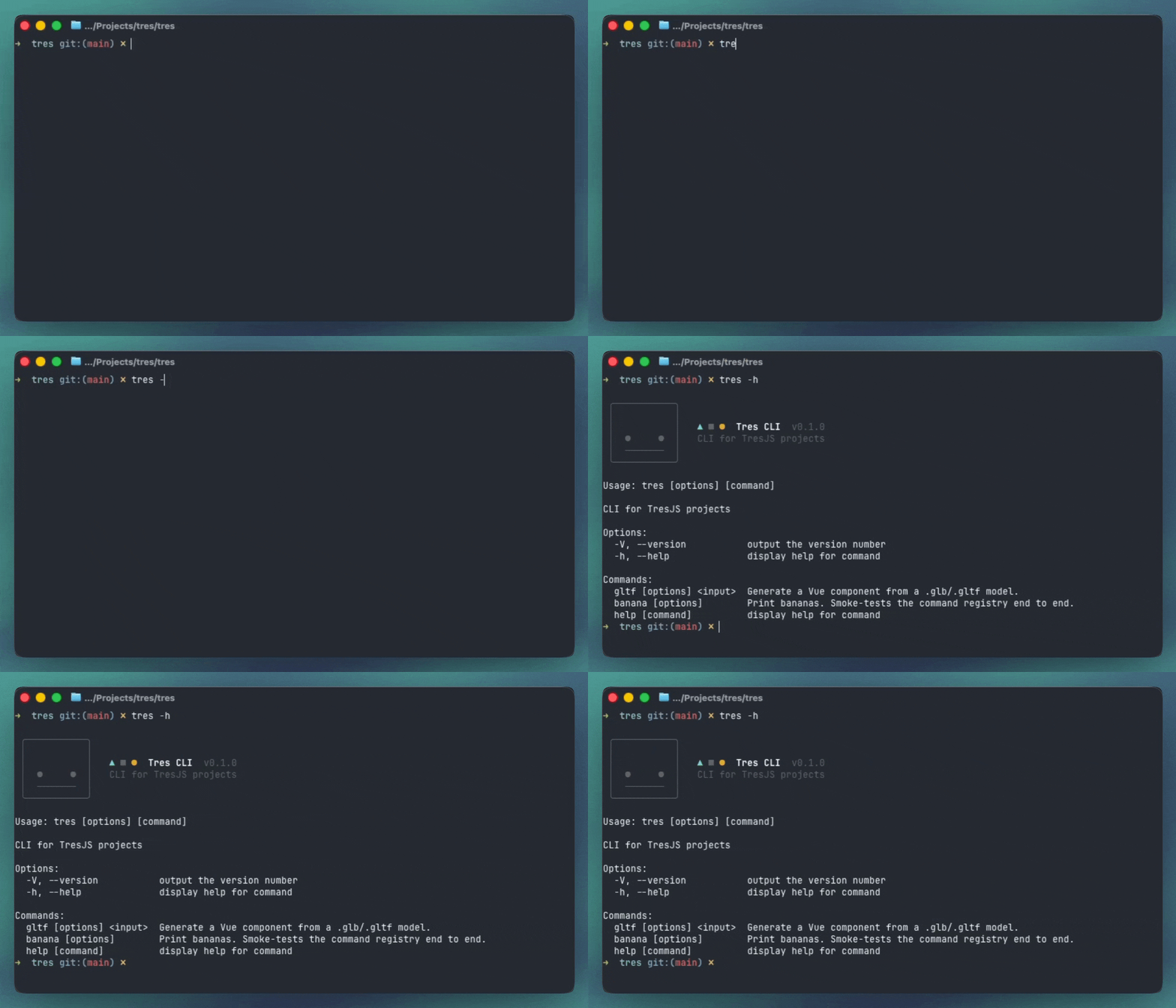
TresJS has a command line now. @tresjs/cli exposes a single tres binary, and its first command is the one we have wanted for years.
tres gltf: models become components
tres gltf <input> turns a .glb or .gltf into a typed Vue SFC (#1464). Think gltfjsx, but for Vue and with a twist.
tres gltf public/models/robot.glb
# ✔ src/models/Robot.gen.vue
#   3 slots: Head, Body, Base
The twist is slots over editing generated code. Every renderable node becomes a <slot> whose fallback is the generated markup. You override one node from your own file, and when the artist re-exports and you regenerate, the override survives because it never lived in the generated file:
<Robot>
  <template #Head="{ node }">
    <TresMesh :geometry="node.geometry" :material="hologram" @click="explode" />
  </template>
</Robot>
The generated component also declares the shape of the model it came from. node above is a Mesh, not an any. A mesh the artist renamed becomes a type error at the override that used it. Animated models get their clip names as a union, so actions.Idle is checked and a typo fails at compile time:
<Robot @ready="({ actions }) => actions.Idle?.play()" />
Mixamo, KayKit and Quaternius ship clips in separate files? Pass them with -a and they get merged into the model, with track targets checked against the model's node names.
--transform: the asset pipeline
tres gltf --transform runs the model through glTF-Transform before generating (#1467): dedup, weld, texture compression to WebP (or AVIF, JPEG, PNG), Draco, optional --simplify with meshoptimizer. The generated component targets the optimized file.
--instance: repeated meshes, one draw call
tres gltf --instance collapses meshes that share a geometry and material into a single InstancedMesh (#1472). Fifty screws cost the draw call of one. The output splits into a provider that owns the load and the batches, and a model component that renders <Instance> against them. --instanceall batches every eligible mesh, which pays off when the whole model is on screen many times.
--physics rapier: colliders from Blender
This is the one I am most excited about. tres gltf --physics rapier reads collision off node names, using Godot's suffix vocabulary (#1474). An artist authors physics in Blender, and nobody hand-edits the generated component:
tres gltf public/models/level.glb --physics rapier
<RigidBody type="fixed" collider="convexHull">
  <TresMesh :geometry="nodes['Floor-convcol'].geometry" :material="materials.prototype" />
</RigidBody>

<RigidBody type="fixed" collider="convexHull">
  <TresMesh :geometry="nodes['Stairs_Collision-convcolonly'].geometry" :visible="false" />
</RigidBody>
-col/-colonly: fixed trimesh body, drawn or hidden-convcol/-convcolonly: fixed convex hull, drawn or hidden-rigid: dynamic convex hull-rb-<type>: pick the body type yourself-sensor: a hidden trigger volume
Nothing is sized at generate time. RigidBody derives colliders from the mesh geometry at load, so a re-export that reshapes a mesh reshapes its collider too. A suffix that nearly parses is reported instead of silently dropped, and it combines with --instance.
Everything is documented at docs.tresjs.org/cli.
Instances and Merged
Instancing is not only for the CLI. Cientos gained two abstractions that make it declarative (#1468).
<Instances> owns a single InstancedMesh for a shared geometry and material. Each <Instance> inside is a normal node in the Vue tree: give it a position, nest it in a group, toggle it with v-if, listen to @click on one of them. A v-for of a thousand costs one draw call.
<Instances :geometry="geometry" :material="material">
  <Instance
    v-for="(position, i) in cubes"
    :key="i"
    :position="position"
    :color="i === selected ? '#f97316' : '#38bdf8'"
    @click="selected = i"
  />
</Instances>
<Merged> takes a { name: mesh } map, typically the nodes off useGLTF, and builds one batch per entry. Any descendant, at any depth and in any component, joins one by name with <Instance batch="Body" />. A robot made of two meshes drawn 49 times is two draw calls, not 98.
Pointer events resolve per instance, the color buffer is only allocated when an instance actually asks for a color, and limit is a hint rather than a hard cap: exceed it and the batch reallocates with a warning telling you the value to set.
More goodies in Cientos
Refractor
The sibling of Reflector. <Refractor> renders what is behind it with a refractive distortion, for glass panels, water surfaces and portals of the less magical kind (#1422). It takes a custom shader too, and the docs demo ships an animated ripple effect to copy from. The Reflector demos got a refresh in the same PR.
RoundedPlane
A plane with rounded corners, <RoundedPlane>, with the geometry vendored from pmndrs/maath so it adds no dependency. Cards, UI panels and, yes, portal frames.
<RoundedPlane :args="[1.5, 1, 0.2, 16]" color="orange" />
KeyboardControls gets Q and E
Fly down with Q, fly up with E, the way Unreal Engine and most world editors do it (#1449). Thanks Jaime!
Stage shadows land where they should
A first-time contributor, Sandros94, noticed that <Stage> was drawing its ground shadow at the <Align> origin instead of under the model. That was the loose thread. Pulling it fixed a whole list of things (#1496):
- The shadow now follows the aligned content's bottom,
top,bottomanddisableYincluded, andoffsetis the full distance between content and shadow plane instead of half of it - The
shadowsobject is no longer spread wholesale into<RandomizedLights>,<Bounds>,<ContactShadows>and<AccumulativeShadows>. Before,sizewas overriding the lights' frustum andtypewas even overwriting the three.js object's.type biasdefaults to-0.0001as documented, and is inverted for accumulative lights like drei doesshadows: nulldisables shadows instead of crashingMeshReflectionMaterialhad the same leak:resolution,blurSizeand friends ended up on the material. They are now stripped, the wayMeshTransmissionMaterialalready does<Align>guards against empty bounds, which used to produce infinite dimensions
A follow-up (#1497) went after the GPU. Changing count on RandomizedLights rebuilt every light with three.js defaults, so size, mapSize, near and far were silently lost, and the old lights were never disposed. AccumulativeShadows never released its ProgressiveLightMap render targets either. Both leaks are closed now: texture count stays flat across count changes and mount/unmount cycles. Both fixes shipped in @tresjs/cientos@5.9.1.
Fixes
Core: WebGPU awareness and a few fixes
@tresjs/core@5.9.0 exposes the renderer type as public API (#1440). useTres() now returns a reactive isWebGPU flag, and isWebGPURenderer() / isWebGLRenderer() type guards are exported, so a component can branch on the renderer instead of guessing:
const { isWebGPU } = useTres()

const material = computed(() => isWebGPU.value ? nodeMaterial : glslMaterial)
Fixes worth knowing about:
shadowMapTypedefaults toPCFShadowMap(#1483). Three deprecatedPCFSoftShadowMapon WebGL and was silently replacing it anyway, logging a warning on every first render. Output is identical, the console is quieter.PCFSoftShadowMapremains valid on WebGPU.customRendererOptionsactually applies (#1479). The default was keyed to a prop that did not exist, so:custom-renderer-optionswas ignored at runtime. Thanks Jungzl!useCamerauses a shallow ref (#1453), courtesy of Eduardo San Martin Morote of Vue Router and Pinia fame. Fewer deep-reactivity surprises, better performance.
Tres Leches: search, copy for AI, and docs
@tresjs/leches@1.3.0 adds two panel actions to every expanded panel (#1506):
- Search. Filter controls by name. Folders keep their structure and their open state while you type, so a panel with forty controls stays usable.
- Copy as JSON. Copy the current values with stable control keys, and without display-only controls. Tune a scene by hand, then paste the values into your code or into your AI assistant of choice.
Try it on the noise shader from the new docs hero. Move the sliders, hit Randomize, then search for warp or copy the values:
Tres Leches also has its own documentation site now, at leches.tresjs.org (#1198), with installation, controls, reactive state, folders, multiple panels and the full API. The same PR fixes dark mode.
@tresjs/leches@1.3.1 changes how folder names become key prefixes (#1509). Before, only some emoji were stripped, so useControls('⛰ Terrain', { height }) gave you ⛰TerrainHeight, a key you could not destructure. Now every emoji and non-ASCII symbol is stripped, and accented and non-Latin letters stay. If you used bracket access such as controls['⛰TerrainHeight'], change it to TerrainHeight.Glyph speaks Vue
Glyph, the new typography engine from pmndrs, ships with first-class TresJS support. It does font baking, Unicode shaping, paragraph layout and batched text rendering, and @pmndrs/glyph/vue gives you all of it as Vue components.
Glyph needs WebGPU, so pass a WebGPURenderer factory to TresCanvas through its renderer prop:
<script setup lang="ts">
import { GlyphProvider, Text } from '@pmndrs/glyph/vue'
import { preloadSlug } from '@pmndrs/glyph/vue/slug'
import { TresCanvas, type TresRendererSetupContext } from '@tresjs/core'
import { WebGPURenderer } from 'three/webgpu'
import { toValue } from 'vue'

preloadSlug('/fonts/Inter.font.glb')

const createRenderer = (context: TresRendererSetupContext) => new WebGPURenderer({ canvas: toValue(context.canvas) })
</script>

<template>
  <TresCanvas :renderer="createRenderer">
    <GlyphProvider handle="hud" :font-faces="{ Inter: '/fonts/Inter.font.glb' }">
      <Text font="Inter">Hello, HUD</Text>
    </GlyphProvider>
  </TresCanvas>
</template>
A <Text> renders once its fonts load, and load failures arrive through @error. To load a font inside a component, use useSlug, useMsdf or useBitmap from @pmndrs/glyph/vue/*. Each returns a ready promise you can await under <Suspense>. Full details in the Glyph README.
WebGLRenderer.Everything in sync
The whole family moved together on September 14, September 25 and again on September 29. These are the latest:
@tresjs/core@5.9.2@tresjs/cientos@5.9.2@tresjs/rapier@1.1.2@tresjs/post-processing@3.9.1@tresjs/nuxt@5.7.2@tresjs/leches@1.3.1@tresjs/cli@0.1.1
pnpm up @tresjs/core @tresjs/cientos @tresjs/rapier @tresjs/post-processing @tresjs/nuxt @tresjs/leches
The September 25 round carries the Stage and shadow fixes above, restores math prop types with @types/three 0.186 (#1504) and adds a radius prop to BloomPmndrs (#1494). The September 29 round brings the Tres Leches features below, and aligns every other package on @tresjs/eslint-config@1.7.0. Full notes for every package live on GitHub Releases.
New in the Lab
lab.tresjs.org got a summer batch too:
- Portals RPG Difficulty: the one at the top of this post. Three portals, three worlds, one
MeshPortalMaterial. - Glyph Cut Out: text rendered with pmndrs Glyph on WebGPU, straight from
@pmndrs/glyph/vue. - Plexus Particles: WebGPU + TSL VFX. Mouse-spawned glowing particles linked to their nearest neighbours, with turbulence and bloom, ported from the three.js
webgpu_tsl_vfx_linkedparticlesexample. - Gelatinous Cube: drei's classic, rebuilt with
MeshTransmissionMaterial. A skeleton and its weapons frozen inside a translucent cube. - Rapier Vehicle: Rapier's ray-cast vehicle controller driven from
useRapier(). WASD to drive, Space to brake, R to reset. - Rapier Basketball: arcade mini basketball by Nathan Mande. Aim with the arrow keys, adjust power, shoot for streaks.
From the community
Thanks
This summer was a team effort. Nathan Mande and Jaime Torrealba carried Rapier to v1 and kept Cientos growing, Eduardo San Martin Morote and Jungzl sent core fixes, Sandros94 made a first contribution that untangled Stage and plugged two GPU leaks, and everyone who opened an issue against the alpha shaped what stable looks like 🙌.
See you next month
Portals, physics, instancing and a CLI in one summer. Next up: closing the MVP gaps on MeshPortalMaterial (edge blur, pointer events, WebGPU) and growing the tres CLI beyond glTF. If there is a command you would love to have, tell us.
Got something cool built with Tres? Share it in our Discord. It might headline the next Loop Chronicles.
Happy crafting ✌️.